

Description
Art-Fu: All-in-One Creative Resource Hub
Overview
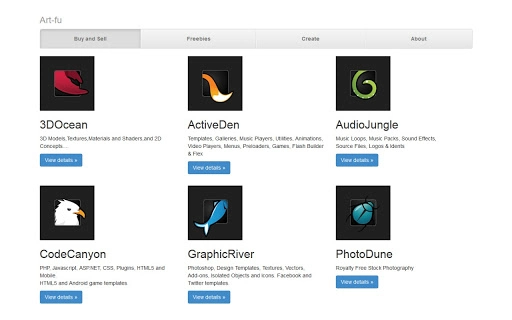
Art-Fu is a desktop application designed to consolidate a wide range of creative assets into a single, accessible platform. It serves as a centralized hub for digital creators seeking high-quality resources such as stock audio, website templates, Facebook templates, Android and Flash game templates, WordPress themes, 3D models, stock photos, stock motion video, and plugins. The software aims to streamline the creative workflow by reducing the need to navigate multiple websites or marketplaces for different types of media. Its structure reflects the legacy of the now-defunct Artist Market, adapting its concept into a modern desktop experience.
Target users include freelance designers, web developers, game creators, content producers, and independent artists who frequently require diverse digital assets. The platform supports both consumption and contribution, allowing talented individuals to research marketable items and potentially sign up as exclusive authors to sell their own creations. This dual functionality encourages community-driven growth and provides a sustainable ecosystem for creators. While the developer’s background is not specified, the application’s design suggests a focus on usability and asset discoverability.
Real-world usage scenarios include rapid prototyping of websites using pre-built templates, sourcing audio for video projects, or acquiring 3D models for animation. The software’s interface enables quick filtering and searching across categories, making it suitable for both casual and professional use. As a desktop tool, it offers offline access to previously downloaded assets, enhancing workflow continuity.
Key Features & Capabilities
- Centralized Creative Asset Library – Aggregates diverse resources like stock photos, motion videos, audio files, and templates in one location, reducing the need to switch between platforms.
- Multi-Format Template Support – Offers ready-to-use templates for websites, social media (Facebook), Android and Flash games, and WordPress, accelerating project setup.
- Asset Contribution Portal – Enables registered users to research trending items and potentially become exclusive authors, uploading and selling their own digital creations.
- Search and Filter System – Allows users to locate specific assets by category, format, or keyword, improving efficiency during creative development.
- Offline Access – Once assets are downloaded, they can be accessed without an internet connection, supporting uninterrupted workflow.
These features are particularly useful in time-sensitive projects where rapid access to verified resources is essential. For example, a video editor can quickly locate and download stock motion video clips, while a web developer might use a pre-designed WordPress theme to launch a client site faster. The ability to contribute assets opens a path for creators to monetize their work within the same ecosystem, fostering a self-sustaining creative network.
User Interface, Workflow & Performance
The user interface of Art-Fu is structured to prioritize accessibility and visual organization. Navigation is likely centered around category-based menus, with intuitive tabs or panels for different asset types. The layout appears optimized for quick browsing, with thumbnails, metadata previews, and search bars positioned for efficient interaction. Users can expect a streamlined workflow from discovery to download, with minimal steps required to access or save assets.
Workflow efficiency is enhanced by the ability to filter results by format, popularity, or licensing type, which helps users make informed decisions. The software’s performance is expected to remain stable during typical usage, though exact resource consumption details were not provided. The developer did not specify CPU or RAM behavior under load, nor did they outline performance benchmarks. General software behavior suggests that performance will depend on system configuration and the number of assets being processed simultaneously.
Stability is assumed to be consistent with standard desktop applications, but no user-reported crash data or error logs were included. As a desktop application with a 100 MB installation size, it is designed to be lightweight, which may contribute to smoother operation on mid-tier hardware. However, actual performance may vary based on the user’s environment and internet speed during asset downloads.
Compatibility & System Requirements
Art-Fu is available for both Windows and Mac operating systems, supporting a broad range of desktop users. The software version is 1.0, indicating an initial release with foundational functionality. Installation requires 100 MB of disk space, which is modest and suitable for most modern systems.
Exact system requirements were not listed. Compatibility information is limited to the operating systems mentioned. The developer did not provide details on minimum CPU, RAM, or graphics specifications. As such, users are advised to ensure their systems meet general desktop application standards. The software may function on systems with at least 2 GB of RAM and a modern processor, though this is not confirmed.
Platform compatibility is confirmed for both Windows and Mac, but no mention of support for Linux or other operating systems was made. Users should verify their system configuration before installation, especially if running older or less common hardware.
Pros and Cons
Pros
- Comprehensive collection of creative assets in one place
- Supports multiple formats including templates, 3D models, and motion video
- Offers a dual-purpose model: consumption and contribution for creators
- Offline access to downloaded assets improves workflow continuity
- Lightweight installation size (100 MB) ensures broad accessibility
Cons
- No official system requirements provided
- Performance and resource usage details were not specified
- Developer background remains undisclosed
- Limited information on update frequency or support lifecycle
- Platform support is confirmed only for Windows and Mac
FAQ Section
Is Art-Fu compatible with Windows and Mac?
Yes, Art-Fu is available for both Windows and Mac operating systems. No other platforms are currently supported.
Is the software free to use?
Yes, Art-Fu is available at no cost. There are no subscription fees or in-app purchase requirements for basic access.
Can I sell my own creative assets through Art-Fu?
Yes, the platform allows registered users to research marketable items and potentially sign up as exclusive authors to upload and sell their own creations.
Does Art-Fu require an internet connection to function?
While an internet connection is needed for browsing and downloading assets, previously downloaded content can be accessed offline.
How often is Art-Fu updated?
The update frequency is not specified. Users should check the official site for the latest version and release notes.
Final Thoughts + CTA
Art-Fu presents a compelling solution for digital creators seeking a unified platform to discover and manage diverse creative resources. By consolidating stock audio, templates, 3D models, and more into a single desktop application, it significantly reduces friction in the creative process. The inclusion of a contributor model adds long-term value, enabling artists to not only consume but also monetize their work within the same ecosystem.
Although detailed technical specifications and system requirements are not provided, the lightweight 100 MB footprint and cross-platform availability suggest broad accessibility. The software is ideal for freelance designers, web developers, game creators, and content producers who rely on a steady stream of high-quality digital assets.
With its intuitive interface and focus on efficiency, Art-Fu stands out as a modern evolution of the classic Artist Market concept. For those in need of a centralized, free creative tool, it offers a strong foundation for productivity and collaboration.
Download Art-Fu now
Guides & Tutorials for Art-Fu App for Chrome
How to install Art-Fu App for Chrome
- Click the Preview / Download button above.
- Once redirected, accept the terms and click Install.
- Wait for the Art-Fu App for Chrome download to finish on your device.
How to use Art-Fu App for Chrome
This software is primarily used for its core features described above. Open the app after installation to explore its capabilities.
User Reviews for Art-Fu App for Chrome 0
No reviews found





